

Harness engineering
Harness engineering is the practice of improving a coding agent’s output quality and reliability by shaping the software around it, not just the prompt you type into the chat. Instead of treating the coding agent as a black box, you shape its harness: the instructions, tools, context, hooks, and integrations around the model, so that correct behavior becomes easier and more repeatable.
In practice, that means shaping the scaffolding around the model so the right information, tools, and constraints show up at the right time. This page walks through several common ways to do that and the tradeoffs that come with them.
AGENTS.md
Section titled “AGENTS.md”AGENTS.md is the lightest-weight way to steer an agent inside a
repository.
It is not the only mechanism available, but it is usually the first place where
project-specific guidance belongs.
Good and bad practices
Section titled “Good and bad practices”Let’s start by citing rules from Claude docs . They are pretty good:
| ✅ Include | ❌ Exclude |
|---|---|
| Bash commands Claude can’t guess | Anything Claude can figure out by reading code |
| Code style rules that differ from defaults | Standard language conventions Claude already knows |
| Testing instructions and preferred test runners | Detailed API documentation (link to docs instead) |
| Repository etiquette (branch naming, PR conventions) | Information that changes frequently |
| Architectural decisions specific to your project | Long explanations or tutorials |
| Developer environment quirks (required env vars) | File-by-file descriptions of the codebase |
| Common gotchas or non-obvious behaviors | Self-evident practices like “write clean code” |
On top of that, we would add the following:
| ✅ Include | ❌ Exclude |
|---|---|
| Only crucial and frequently needed hints | Anything that is one ls or cat call away |
| Terser language throughout the file | Rules better handled by hooks or extensions |
As your codebase and AGENTS.md grow, it will make sense to move chunks of that
file into either skills or separate files in the docs/ directory, while
AGENTS.md becomes mostly a table of contents.
Below, you can see an example of what NOT to do:
This is a Next.js project showcasing pet grooming practices.
# Command Reference
```bash# Install dependenciesnpm install
# Clean build artifactsnpm run clean
# Type checkingnpm run typecheck
# Lintingnpm run lint```
# Structure
- `src/SCREENS.ts`: Screen name constants- `src/ROUTES.ts`: Route definitions and builders- `src/NAVIGATORS.ts`: Navigator configurationSkills
Section titled “Skills”Agent Skills is an open standard for extending AI agents with specialized capabilities. Skills package domain-specific knowledge and workflows that agents can use to perform specific tasks.
A skill is just a well-named and well-described directory containing a SKILL.md
file with arbitrary Markdown content.
Agents initially only see all loadable skill names and descriptions,
and they need to explicitly load full skill definitions.
You can mention a skill explicitly, or the model may decide to do it by itself.
What goes inside a skill is up to your imagination.
Choosing the right skills
Section titled “Choosing the right skills”Skills are domain-specific by nature. We can’t tell you upfront what skills you might need without knowing what you’re working on. What we can tell you is that unlike other harness-specific mechanisms, skills are largely portable and can be used in many creative ways. You may use them to save repetitive prompts, build more elaborate rules, provide hard-to-reach up-to-date documentation about your toolchain or dependencies, or define agent personalities.
Where to find skills
Section titled “Where to find skills”skills.sh
Section titled “skills.sh”The skills.sh directory
is a great place to look for valuable skills.
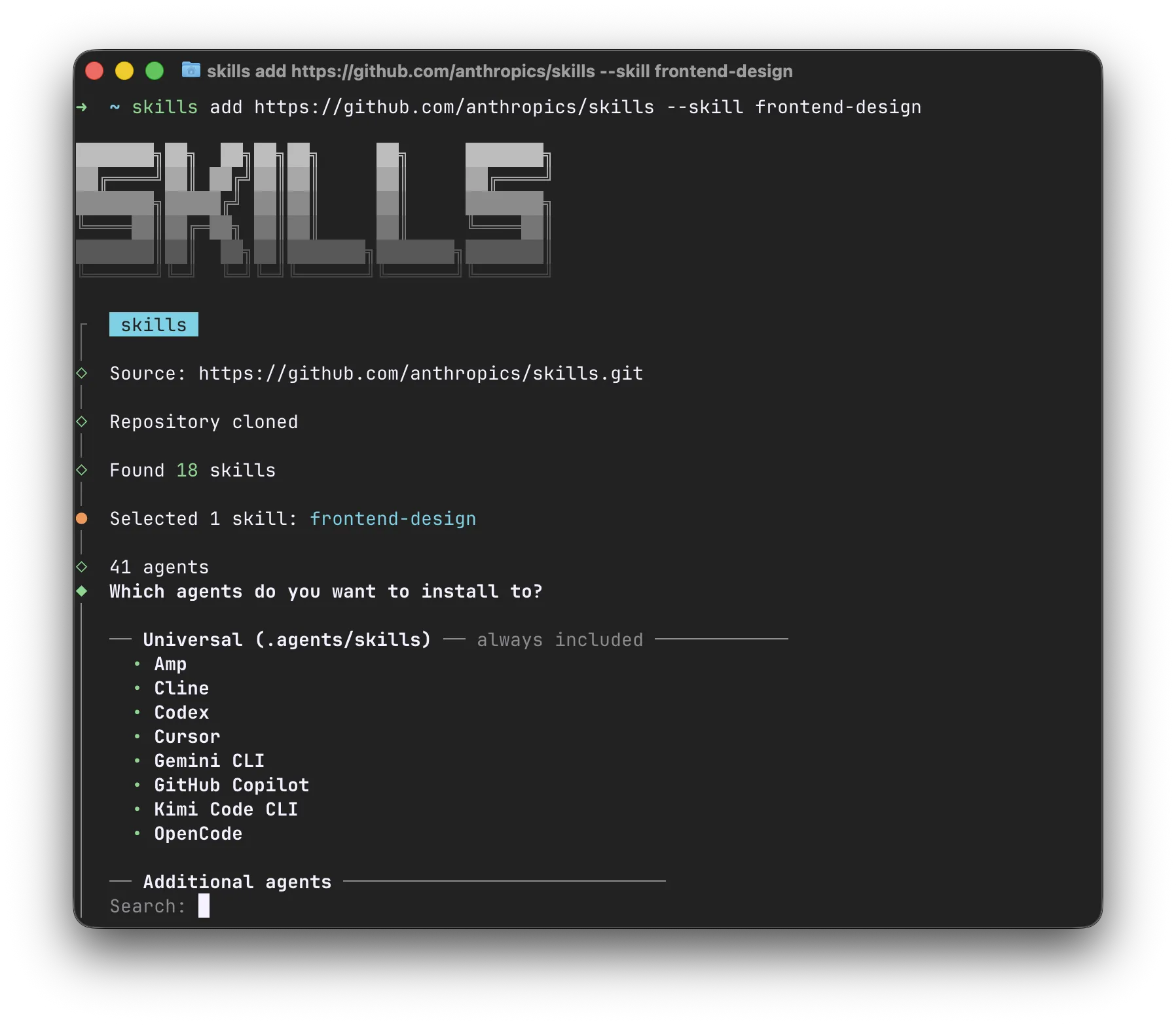
The accompanying npx skills CLI installs them in the right format for 40+
agent harnesses, including Claude Code, Cursor, Amp, Codex, Gemini CLI, GitHub
Copilot, and many more.
Skill repositories
Section titled “Skill repositories”There are many GitHub repositories that collect useful skills, similar to the Awesome X list repositories. Many companies use these repositories as part of their marketing strategy, providing skills that offer useful guidance for their products.
For example:
- anthropics/skills Anthropic.
- openai/skills OpenAI.
- software-mansion-labs/skills Software Mansion.
- GitHub Topic: agent-skills
Skills are forkable and your own
Section titled “Skills are forkable and your own”Skills are meant to be amended by you or your agent to tailor to your project, machine, and taste.
- Many harnesses have skills for creating new skills or updating/forking existing ones.
- Don’t be afraid to fork a third-party skill. If the “upstream” skill is updated, tell your agent to update your fork.
Security considerations
Section titled “Security considerations”Before you try a new skill, always read its entire source and think about its security considerations. Skills are a powerful mechanism partly because they can be insecure.
The surrounding ecosystem is still very young, and many skill-based attacks are happening in the wild. Especially be cautious about updating third-party skills, you never know when an upstream repository becomes compromised and the attacker inserts prompt injections.
These writeups show how this can go wrong in practice:
- Weaponizing Claude Skills with MedusaLocker Inga Cherny. 2025-12-02. A seemingly harmless skill step in a GIF workflow was used to fetch and execute MedusaLocker ransomware, showing how a reviewed skill can still hide second-stage execution.
- Hidden Unicode Instructions in Skills Johann Rehberger. 2026-02-11. Hidden Unicode Tag characters were used to smuggle invisible instructions into a skill, which means visual source review alone may miss malicious behavior.
MCP is a protocol through which AI applications can connect to data sources (local and remote), tools (applications and services), and workflows (like domain-specialized models). MCP servers plug new tools into your agent to extend its capabilities beyond the filesystem, bash commands, and web browsing.
MCP servers can run locally (like npx @playwright/mcp ),
allowing your agent to interact with your local environment;
or be remote HTTP-based servers, like Linear MCP ,
that connect your agent to remote services.
Pros and cons
Section titled “Pros and cons”One advantage of MCP that CLIs and skills do not solve is authentication: you can easily connect to MCP services using API keys or OAuth with the UX provided by your harness.
The downside of MCP is that the specification requires harnesses to inject information about all MCP tools into the system prompt. This will sound less magic in future chapters, but in a nutshell, too many MCP servers will make your agent dumb, and the harness will take a long time to start. Claude Code is experimenting with lazy loading MCP tools, but this is still an unstable feature that is also not available elsewhere.
Another problem is that MCP tools are not easily composable. Agents are trained a lot on Bash, and they are excellent on piping, awk, or jq. They can’t use these tools on MCP outputs.
What MCPs might I use?
Section titled “What MCPs might I use?”The current consensus is to use MCPs mostly for connecting to external services, like Linear, Figma, Slack or Sentry. A good starting point for seeing which popular MCPs are available is GitHub MCP Registry .
Some MCPs used to be popular, but now have more efficient alternatives in the form of CLIs or Skills. Examples include:
- GitHub MCP provides
far too many tools and overloads the agent’s context.
Models have great knowledge of
the
ghCLI and can do a lot by leveraging its JSON output and piping through Bash commands. - Context7 can be
effectively replaced with domain-dedicated skills akin
to vercel-react-best-practices ,
or just more and more documentation websites support
Content: text/markdownresponses.
Security considerations
Section titled “Security considerations”MCP servers have security considerations similar to those of Skills and any other CLI or remote service. You are unlikely to use many MCPs, and the ones most commonly used are access points to well-known services. So… in such cases just make sure your agents will not perform destructive actions on your behalf 🙂.
Subagents
Section titled “Subagents”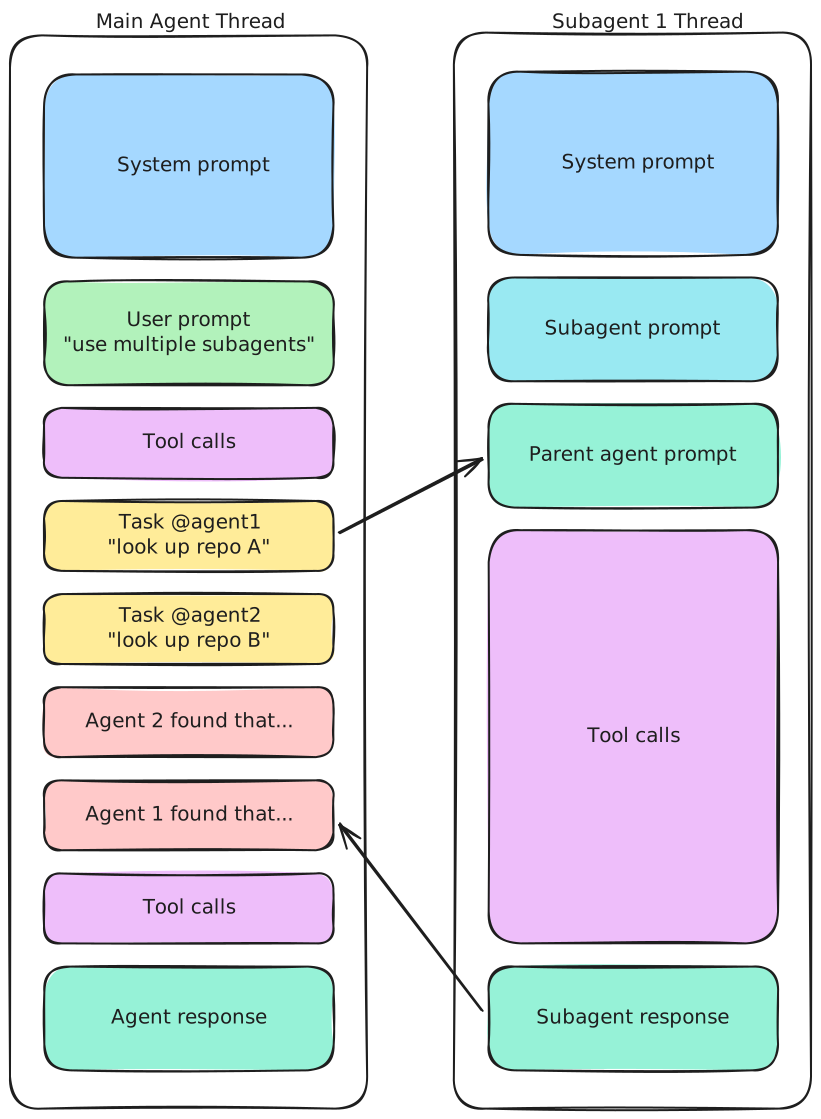
Subagents are extra agent runs that the main agent starts to handle a narrower piece of work. Their biggest advantage is not that they magically become a “database expert” or a “frontend engineer”. It is that they keep context separated.
This matters because long agent conversations degrade quickly. Exploration notes, false starts, and verbose tool output all compete with the actual task for attention. Offloading a bounded investigation to a subagent keeps the main thread smaller and gives you a cleaner final result.
Read more:
- Create custom subagents - Claude Code Docs Anthropic.
- Cursor Subagents Cursor.
- Codex Multi-agents OpenAI.
Hooks are the part of the harness that runs deterministic logic around the agent. Different tools expose them differently, but the idea is the same: when something should happen every time, do not rely on the model to remember it.
Hooks are a better home for repetitive enforcement than AGENTS.md.
Formatting code,
running linters,
asking for approval before sensitive commands,
posting notifications,
or opening a pull request are all examples of work that can often be attached
to a well-placed hook.
A good hook reduces prompt clutter instead of adding to it. If the formatter succeeds, the agent usually does not need to hear about it. If a check fails, then the failure should come back with enough detail to guide the next step. This kind of back-pressure is useful because it keeps routine success paths out of the model’s way while still surfacing actionable problems. Written instructions should cover the cases that require judgment. Hooks should cover the cases that do not.
Read more:
- Hooks reference - Claude Code Docs Anthropic.
- Hooks Docs Cursor.
When to use what
Section titled “When to use what”If you are unsure which mechanism to reach for, use this rule of thumb:
| Tool | Use it when |
|---|---|
| AGENTS.md | You constantly repeat specific lightweight information in your prompts. |
| Skills | You need reusable, named knowledge or workflows or for anything not covered by other tools. |
| MCP | You need authenticated access to an external service that you use very frequently. |
| Subagents | You can delegate a bounded or parallelizable task to keep the main thread smaller. |
| Hooks | You have deterministic, mechanical logic meant to happen every time without depending on the model to remember it. |